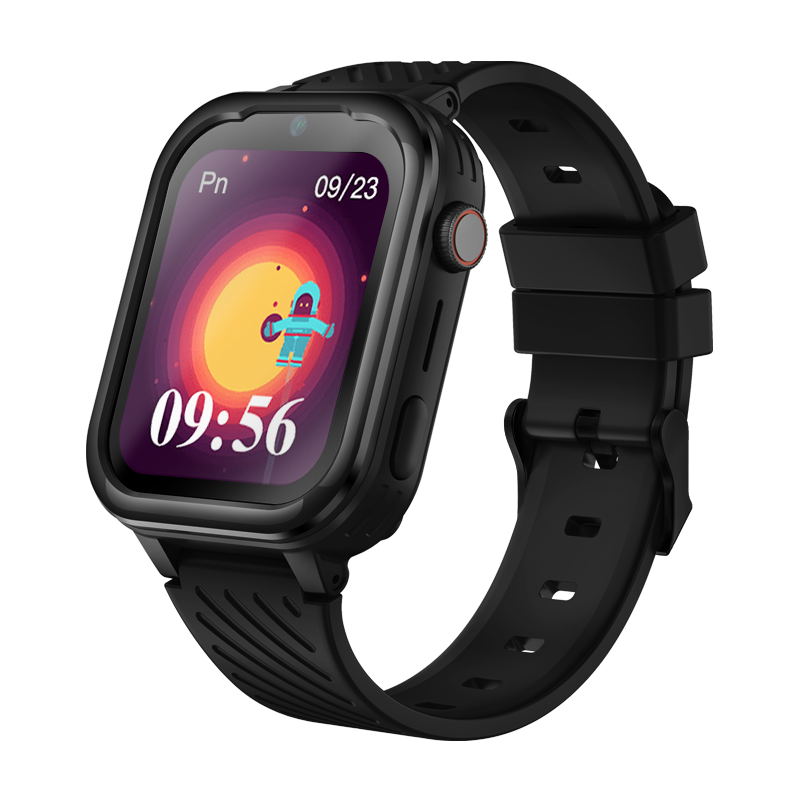



Smartwatch GARETT Kids Essa 4G

DEDICATED APP FOR PARENTS

Garett Tracker Icon

Garett Tracker

Download the app Garett Tracker

Quick Start Guide

1

Charge the watch

Before using the device for the first time, charge it using the included charging cable. The first charge should take about 60 minutes.

Charging icon

2

Insert a SIM card

Insert an active SIM card into the watch. The card must have a balance and the PIN lock must be disabled.
SIM card icon

3

Download the app

Install the dedicated Garett Tracker app from the Google Play Store or the App Store on your smartphone.


4

Add the watch

Create an account in the app and add the watch using the REG CODE from the smartwatch menu.

ADD icon

5

Read the full user manual

For complete information about the product, its features, setup, and safe use, read the full user manual.

User manual icon

Done! That’s it.

You can now continue setting up the watch, add your most important contacts and SOS emergency numbers, and set up a safe zone on the map.

User manual

Video support

Garett Tracker app configuration and smartwatch pairing
PL
Konfiguracja oraz parowanie aplikacji Garett Tracker – Polski
Miniaturka wideo

EN
Configuration and pairing of the Garett Tracker app – English
Miniaturka wideo

How to install a SIM card in a smartwatch
PL
Jak zainstalować kartę SIM w zegarku dziecięcym – Polski
Miniaturka wideo

EN
How to Install a SIM Card in a Kids’ Smartwatch – English
Miniaturka wideo

CZ
Jak nainstalovat SIM kartu do dětských hodinek – Čeština
Miniaturka wideo

SK
Ako nainštalovať SIM kartu do detských hodiniek – Slovenčina
Miniaturka wideo

How to improve smartwatch GPS location accuracy
PL
Jak poprawić dokładność lokalizacji GPS – Polski
Miniaturka wideo

EN
How to improve GPS location accuracy – English
Miniaturka wideo

CZ
Jak zlepšit přesnost určení polohy GPS – Čeština
Miniaturka wideo

SK
Ako zosiliť presnosť určenia polohy GPS – Slovenčina
Miniaturka wideo

How to change the GPS operating mode on a smartwatch
PL
Jak zmienić tryb pracy GPS w smartwatchu – Polski
Miniaturka wideo

EN
How to change the GPS operating mode – English
Miniaturka wideo

CZ
Jak změnit režim provozu GPS v hodinkách – Čeština
Miniaturka wideo

SK
Ako zmeniť režim prevádzky GPS v hodinkách – Slovenčina
Miniaturka wideo

How to set up a Geofence on a smartwatch
PL
Jak ustawić GEOogrodzenie w zegarku – Polski
Miniaturka wideo

EN
How to set up GEOfencing on a smartwatch – English
Miniaturka wideo

CZ
Jak nastavit geofencing v hodinkách – Čeština
Miniaturka wideo

SK
Ako nastaviť geofencing v hodinkách – Slovenčina
Miniaturka wideo

GPS Technical Support
PL
Pomoc techniczna GPS w zegarkach – Polski
Miniaturka wideo

EN
Technical support for GPS in smartwatches – English
Miniaturka wideo

CZ
Technická podpora pro GPS v hodinkách – Čeština
Miniaturka wideo

SK
Technická podpora pre GPS v hodinkách – Slovenčina
Miniaturka wideo

FAQ

Why won’t the watch turn on?

Check if the watch is charged. Press and hold the power button for a few seconds. If the device does not respond, connect it to the charger for at least 60 minutes and try again.

What kind of SIM card should be used in kids’ smartwatches?

Kids’ smartwatches require a standalone physical nanoSIM card with its own phone number, intended to work directly in the watch. The card cannot be a physical duplicate or linked to an eSIM profile used simultaneously on another device, such as a phone, tablet, or another smartwatch.

The only exception is the Garett Kids eSIM 4G smartwatch. For this model, you need to install a virtual eSIM card, which must have a new, independent number – it cannot be a copy of an eSIM number used on another device or a copy of a physical SIM card.

The watch does not detect the SIM card – what should I do?

Make sure the SIM card is active, does not have a PIN code, and is correctly inserted. The card should support 2G/3G/4G LTE networks and data transmission. The card’s account must have sufficient funds to use the Internet. An illustrative picture showing how to properly insert the SIM card can be found in the user manual.

Why doesn’t the watch show the child’s location?

Check if the SIM card has an active data package. The watch should be within range of GSM and GPS networks. Restarting the watch might also help. Keep in mind that in areas surrounded by tall buildings or indoors, the GPS signal may be weakened.

The watch does not connect to the app – what could be the reason?

Make sure that the correct watch ID number has been entered in the app. Check if the watch has internet access and has been correctly added in the parent’s app.

Does the watch work without the app?

Partially, yes – you can check the time, use the camera, or set an alarm. However, location features and communication with the parent require a connection to the app.

Does the watch work abroad?

Yes, provided that the SIM card has data roaming enabled and works on the 2G network in that country. The card should support 2G/3G/4G LTE networks. If the device does not work abroad, we recommend contacting our technical support department.

How long does the battery last in a Garett Kids watch?

Depending on the model and usage – usually from 1 to 3 days.

Is the Garett Kids watch waterproof?

Most models have an IP67 rating, which means resistance to splashes and brief immersion. The watch should not be worn while bathing or in a swimming pool.

The watch shows the wrong time – what should I do?

The time sets automatically once the watch connects to the app and the network. Check the internet access and whether the watch has been properly configured.

What should I do before returning, selling, or passing the watch to another person?

Before returning, selling, or passing the watch to someone else, we recommend deleting all stored data and restoring the device to its factory settings. This will remove your settings and data from the watch, leaving it ready for a fresh configuration.

Please note that performing a reset will erase all saved information and individual settings. Before starting this process, make sure that any important data has been previously saved or synchronized.

How do I factory reset the watch?

In most models, this option can be found in the watch settings. Note: a reset deletes data and requires pairing with the app again.

GPS, Wi-Fi, and LBS location

The watch allows you to track your child’s location in real-time using GPS (outdoors), Wi-Fi (inside buildings), and LBS (approximate location via the GSM network).

SOS Button

When the SOS button is pressed, the watch automatically makes a call to the saved emergency numbers and sends a notification to the guardian with the current location.

Phone Calls

Thanks to the built-in microphone and speaker, the child can receive and make calls to and from approved contacts saved in the application.

Voice Chat

The watch allows the child and guardian to send and receive short voice messages through the mobile application.

Safety Zones

You can set up so-called GEO-fences in the app. If the child leaves the designated area (e.g., school), the guardian will receive an instant notification.

Location History

The parent has access to the route history the child traveled on a given day – even up to a few days back (depending on the model).

Remote Watch Control

Through the app, it is possible to, among other things, turn off the watch remotely, turn on the microphone (ambient listening), block functions, or set silent mode.

Alarms and Reminders

The guardian can set alarms and reminders that will appear on the watch screen.

Camera

The watch is equipped with a camera, allowing the child to take photos. Some models also enable the guardian to take a remote photo.

Pedometer

The built-in pedometer allows you to track your child’s physical activity – the step count can be viewed in the app.

Educational Games

Some models include simple logic games to support your child’s development – with the option to limit playtime via the app.

Waterproof Rating

The protection class indicates the conditions under which the watch can come into contact with water:

IP65 – protection against dust and splashes, e.g., rain. Do not submerge the watch in water.
IP67 – protection against dust and short-term immersion in water. Suitable for daily use, but not for swimming.
IP68 – higher resistance to dust and water. The watch handles tougher conditions better during workouts, rain, or accidental contact with water, but it must be used according to the guidelines for that specific model.
5 ATM – resistance suitable for contact with water during everyday use and surface swimming.

Important: water resistance does not mean complete protection in every situation. Salt water, hot water, detergents, and mechanical damage can affect the device’s seal.

Safety and Compliance

Warranty card

Contact

Service for Poland and other countries

(except the Czech Republic and Slovakia)

GARETT Sp. z o.o.
ul. Sandomierska 209
25-330 Kielce, Polska

✉️ [email protected]

Hotline in Polish and English

📞 +48 41 252 75 10
🕒We work from 08:00 to 16:00

Service for the Czech Republic and Slovakia

RMA s.r.o. Service Centre
K Ochozi 761
59301 Bystřice nad Pernštejnem

✉️ [email protected]

Hotline in Czech and Slovak

📞 +420 603 573 592
🕒 We work from 08:00 to 16:00

This website uses cookies to ensure you get the best experience on our website.